

 Home
HomePrusa Slicer
Version 7.3 by Josh McGee on 2025/10/20 03:08
Load your file
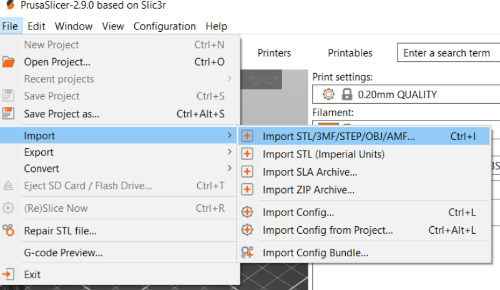
If you have a .stl, .obj, .step, .amf, or .3mf file, use the
File > Import > ImportSTL/3MF/STEP/OBJ/AMF command
Select your print settings
Set the layer height using the Print Settings dropdown to be 0.2 by default.
If you select smaller values then that will allow you to print finer details but the print will take longer.
If you select larger values then your print will have less detail, but it will be faster.
Set the filament type using the Filament dropdown. This should be written on the side of the filament reel.
Set the printer type using the Printer dropdown. This should be written on a wooden card in front of the printer you're using.