
Ender 3 Printing Guide
Last modified by Darren Cocco on 2026/01/13 11:34
Safety Notes
Ender Slicing Configuration

 Home
HomeKeep your hands away from the bed and nozzle - they are hot!
It is better to stop the print via the printer’s control menus rather than cutting the power because printers need a controlled cooldown with their fans running to prevent molten plastic migrating too high up into the extruder. If you have cut power, you can always just power it back on to resume controlled cooling
Motors are generally not strong enough to cause significant damage or injury if jams occur, and can even be pushed aside to clear a jam if necessary.
WARNING
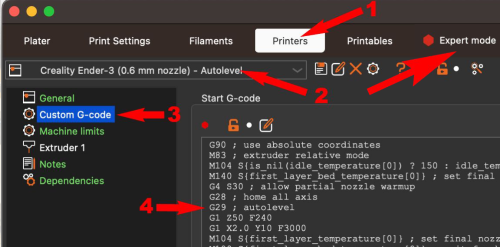
Creality Ender printers require you to add the G29 command in the .gcode in order to perform autolevelling. Enter Expert Mode and then the Custom GCode in your slicer for the current printer configuration to make sure that G29 is run after G28 as shown in the image below.